
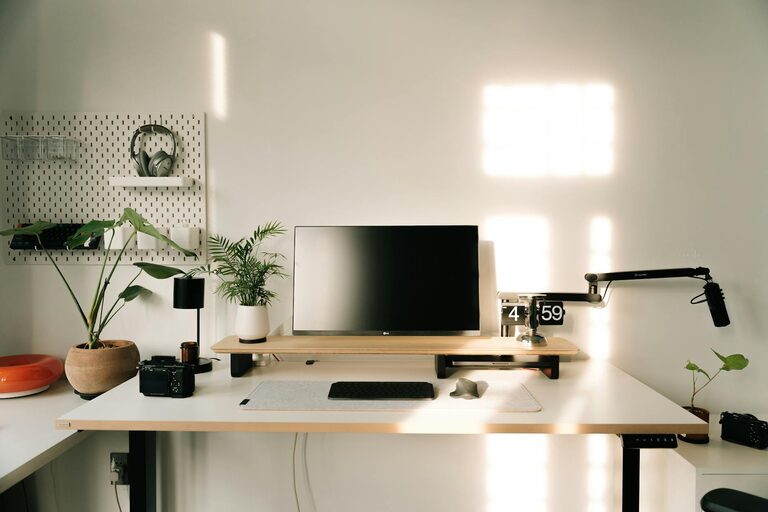
Creating a cozy and productive home workspace is essential for anyone who works or studies from home. A well-designed area can improve focus, reduce stress, and increase overall satisfaction with your daily routine. Whether you have a dedicated room or just a small corner, these tips will help you create an inspiring environment tailored to your needs.
Choose the Right Location
Before setting up your workspace, consider where you want it to be. Here are a few factors to keep in mind:
– Natural Light: Choose a spot near a window if possible. Natural light boosts mood and reduces eye strain.
– Low Traffic Area: Pick a quieter corner to avoid interruptions.
– Adequate Space: Ensure you have enough room for your desk, chair, and any equipment you need.
– Ventilation: Good air flow helps with concentration and comfort.
Invest in Comfortable Furniture
Comfort is key when spending long hours working.
– Ergonomic Chair: A chair that supports your back and encourages good posture can prevent aches and fatigue.
– Desk at the Right Height: Your desk should allow your arms to rest comfortably while typing or writing.
– Adjustable Options: Consider desks or chairs with adjustable heights for flexibility.
Organize Your Space Effectively
An orderly workspace helps reduce distractions and saves time looking for items.
– Use Storage Solutions: Shelves, drawers, and organizers keep your supplies tidy.
– Cable Management: Use clips or boxes to keep cables under control and avoid clutter.
– Minimalism: Keep only necessary items on your desk to maintain focus.
Personalize Your Workspace
Adding personal touches can make your workspace more inviting and inspiring.
– Plants: Small indoor plants improve air quality and add color.
– Artwork: Hang prints or photos that motivate you.
– Comfort Items: A cozy blanket or cushion can add warmth and relax your space.
Pay Attention to Lighting
Proper lighting reduces eye strain and keeps you alert.
– Task Lighting: Use a desk lamp to brighten your workspace.
– Avoid Glare: Position your screen perpendicular to windows.
– Warm Light: Choose bulbs with a warm tone to make the space cozy in the evening.
Incorporate Technology Wisely
Technology should support your work without overwhelming your space.
– Quality Equipment: Invest in reliable hardware like a good keyboard, mouse, and headphones.
– Monitor Stands: Raise screens to eye level to reduce neck strain.
– Wireless Devices: Reduce clutter with wireless peripherals.
Establish Boundaries
To maintain productivity, create clear boundaries between work and personal time.
– Defined Workspace: Dedicate a spot for work only.
– Set Hours: Try to work consistent hours and step away when done.
– Signal Boundaries: Use signs or other cues if sharing space with family or roommates.
Keep Your Workspace Clean
A clean environment fosters focus and wellbeing.
– Daily Tidying: Spend a few minutes each day clearing your desk.
– Regular Deep Cleaning: Wipe down surfaces and organize papers weekly.
– Declutter Digitally: Keep your computer files organized to avoid distractions.
Add Elements That Boost Wellbeing
Feeling good in your workspace encourages productivity.
– Temperature Control: Use a fan or heater to maintain a comfortable temperature.
– Hydration: Keep a water bottle nearby.
– Break Area: If possible, create a small spot for short breaks or stretching.
Conclusion
Designing a cozy and productive home workspace doesn’t require perfection or a big budget. It’s about adjusting your space to fit your lifestyle, comfort, and work habits. By choosing a good location, investing in ergonomic furniture, organizing your area, personalizing with meaningful items, and maintaining cleanliness, you can create a space that helps you do your best work and feel great doing it. Experiment with these tips and make your home workspace your personal productivity haven.