
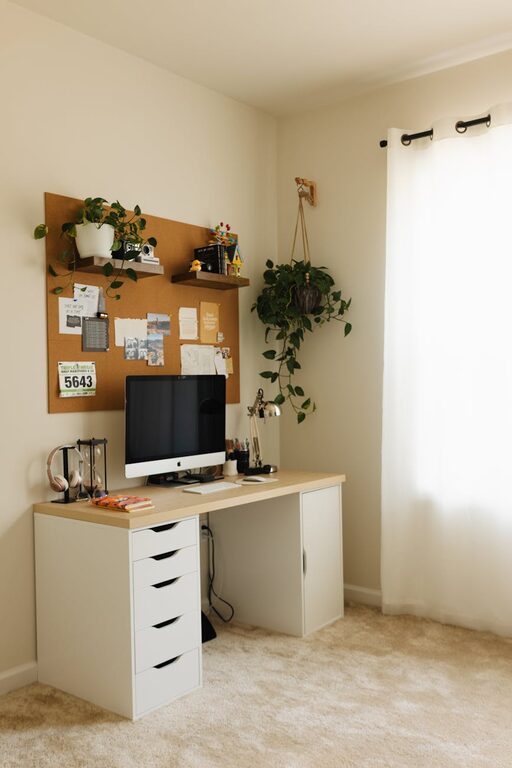
Creating a productive home office environment is essential for anyone working remotely or running a business from home. A well-designed workspace can enhance focus, reduce stress, and improve overall efficiency. Whether you have a dedicated room or a small corner, these simple yet effective tips will help you set up a home office that supports your best work.
Choose the Right Space
The first step in creating a productive home office is selecting the right location. Ideally, this area should be quiet, have good natural light, and be free from frequent distractions.
– Quiet and Private: Pick a spot where you can concentrate uninterrupted. If possible, choose a room with a door you can close.
– Natural Light: Position your desk near a window to take advantage of natural light, which can boost mood and energy.
– Ventilation: Make sure the space has good airflow to keep you comfortable throughout the day.
Invest in Comfortable Furniture
Comfort plays a huge role in productivity. Sitting in an uncomfortable chair or working at a cramped desk can lead to physical discomfort and decreased focus.
– Ergonomic Chair: Choose a chair that supports your lower back, encourages good posture, and allows your feet to rest flat on the floor.
– Desk Height: Your desk should allow your elbows to bend at about 90 degrees while typing or writing.
– Adjustable Setup: Consider a sit-stand desk or accessories like monitor stands to reduce strain.
Organize Your Workspace
A clutter-free environment helps clear your mind and allows you to work more efficiently.
– Declutter Regularly: Remove unnecessary items from your desk and keep only essential tools handy.
– Storage Solutions: Use shelves, drawers, or filing cabinets to keep documents and supplies organized.
– Cable Management: Use clips or ties to minimize tangled cords, which can be distracting and unsafe.
Optimize Lighting
Good lighting reduces eye strain and increases alertness.
– Layered Lighting: Combine natural light with ambient and task lighting. A desk lamp with adjustable brightness can be very useful for focused work.
– Avoid Glare: Position screens and lamps to prevent glare that can cause discomfort.
Minimize Distractions
Home environments can come with many distractions. Setting boundaries helps maintain productivity.
– Set Office Hours: Communicate your work schedule to household members to minimize interruptions.
– Use Noise Control: Noise-canceling headphones or soft background music can drown out disruptive sounds.
– Limit Digital Interruptions: Turn off non-essential notifications and use apps that block distracting websites during work hours.
Personalize Your Space
Your home office should be inviting and inspiring while maintaining professionalism.
– Add Plants: Indoor plants improve air quality and bring a touch of nature to your workspace.
– Decorate Thoughtfully: Use a few personal items like photos or artwork that motivate you but don’t overcrowd the area.
– Choose Calming Colors: Soft, neutral, or cool tones tend to promote concentration and calmness.
Use Technology Wisely
The right technology setup can streamline your work processes.
– Reliable Internet: Ensure a strong and stable internet connection to avoid interruptions during video calls or data uploads.
– Efficient Devices: Use updated computers, printers, and other devices to work smoothly without technical delays.
– Backup Solutions: Regularly back up important files using cloud storage or external drives for peace of mind.
Take Breaks and Move
Staying productive means balancing work with short breaks to recharge.
– Schedule Breaks: Use techniques like the Pomodoro method—working in focused intervals followed by brief rests.
– Physical Movement: Stand up, stretch, or take a short walk to avoid stiffness and refresh your mind.
Maintain Work-Life Balance
Creating clear boundaries between work and home life helps prevent burnout.
– Separate Work and Leisure Areas: Try to limit work activities to your office space, especially if it’s separate from other living areas.
– End-of-Day Routine: Develop a ritual that signals the end of your workday, such as turning off your computer or tidying your desk.
—
By thoughtfully designing your home office with these tips in mind, you can create an environment that supports focus, comfort, and productivity. Small changes can make a big difference in how you feel and perform throughout your workday. Remember to regularly reassess your setup and adjust it as your needs evolve. Happy working!